
Which lights are you installing?
Each system wires and sets up differently. Tap yours for step-by-step help.
 RGB
Full-colour patterns and animation.
- Rhino 2.0 and 2.5 Fattie whips
- Diamond RGB rock lights
- Halos
- RGB strip
- Horizontal whip bar
 RGB+W
Colour plus a dedicated white channel.
- Axion RGB+W rock lights
- Rhino 3.0 RGB+W whips
- RGB+W strip
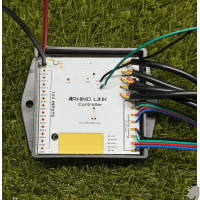 RhinoLink
One controller for RGB lights and Axion rock lights, with zones and vehicle triggers.
- The RhinoLink Bluetooth Controller
- RGB lights and Axion rock lights together
- Vehicle inputs and relay outputs
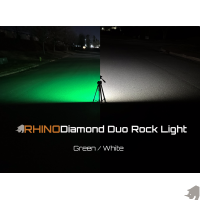 Switched 12V
Wired to a switch. No app, no controller.
- Diamond Duo rock lights
- Twin Color pod lights
- Step lights
- Mini 12V rock lights
- Light bars
Not sure which you have?
Check the light, not the box.
RGB
Rock lights say "RHINO DIAMOND RGB" on the face. Whips are the 2.0 (1") or 2.5 Fattie (1.3").
RGB+W
Rock lights say "RHINO AXION RGBW" on the face. Whips are the 3.0.
RhinoLink
You have the RhinoLink Bluetooth Controller and set it up in the RhinoLED app.
Switched 12V
Diamond Duo rock lights say "RHINO DIAMOND DUO" on the face.
Before you start · Every system
Six rules that protect your lights.
Install damage isn't covered by the warranty. These are the mistakes we see most.
- Wire the controller through a switchWired straight to the battery it draws power all the time and drains it.
- Keep the controller away from heatNot near the engine or exhaust. The housing survives the heat; the electronics inside do not.
- Never plug or unplug with the power onThe surge can damage the lights. That counts as install damage and is not covered.
- 12 volts onlyMore than 12V damages the lights and voids the warranty.
- Test before you secure anythingLay everything out, power it up and check it all works before you run and tie down wire.
- No bare wires touchingCheck every connection before power goes on, and use waterproof connections.
Wiring & switches · Every system
Harnesses and switches.


Other products
Sound deadening.

Stuck? We built it, we can help.
Try troubleshooting first, or call us at 704-270-2695. If a light has failed, start a repair.