ENGINEERED & BUILT IN NORTH CAROLINA Build Your Bundle

704-270-2695 [email protected]
Built in North Carolina
Gallery Find a Dealer Become a Dealer Track Order
Rhino Lights
Sign In Create Account
0

No products in your cart.

Go Shopping
0

No products in your cart.

Go Shopping
  • Rock Lights
    • Start Here
    • Shop & Configure Rock Lights Diamond RGB or Axion RGB+W — compare the systems, choose your count and order
    • RGB vs RGB+W — which system?

    • Shop Direct
    • Axion RGB+W Dedicated white · RGB+W system · pairs with Rhino 3.0
    • Diamond RGB 24-LED RGB · RGB system · pairs with Rhino 2.0 / 2.5
    • Diamond Duo White + accent color · switch-driven, no controller

    • Specialty & Accessories
    • Diamond UV
    • Purple / Yellow Duo
    • Mini 12V — single color · no controller
    • Step Lights
    • Rock Light Accessories
    • All rock light products →
  • Whip Lights
    • Start Here
    • Shop & Compare Whips 2.0 · 2.5 · 3.0 — find the right whip, then build it
    • RGB vs RGB+W — which system?

    • Shop Direct
    • Rhino 2.0 The Classic · 1″ RGB · single or pair · 2–4 ft
    • Rhino 2.5 Fattie The Fattie · 1.3″ RGB · pair · 2–3 ft
    • Rhino 3.0 The Flagship · 1.3″ RGB+W · pair · 2–3 ft · pairs with Axion

    • Accessories
    • Springs
    • Whip Bars
    • Daytime Whips
    • All parts → All whip products →
  • Pod Lights
    • Start Here
    • Build Your Pod System New One pod, a pair, or up to twenty linked — drawn and priced live

    • Compare
    • Why Rhino Pods Modular by design · measured output · construction
    • Popular Pod Setups One pod to a twenty-pod bar — where to start

    • Shop Direct
    • Twin Color Pod Light Single pod, by the each — skip the builder

    • Vehicle-Specific
    • Build Your Pro R New RZR Pro R / Turbo R / Pro XP headlights — 4 pods in a billet frame

    • Accessories
    • Pod Brackets
  • Controllers
    • Next Generation
    • RhinoLink Bluetooth Controller App + vehicle signal control for your RGB system BETA · Pre-order
    • LED Chord App iOS + Android app for the Bluetooth controller

    • Add-On Boards · RGB system
    • Connex Pro Turn signals, brake, reverse integration · RGB system
    • Connex Lite Whips only - turn signal integration · RGB system
    • Bluetooth Controller Original Bluetooth control · runs RGB or RGB+W, one system at a time

    • Installation
    • Wiring Harnesses
    • Switches
  • Accessories
    • RGB LED Strips
    • Prebuilt Strips
    • Bulk Roll
    • RGB+W LED Strips
    • By the Foot New

    • Cleaning
    • Sound Deadening New
    • Apparel
    • Brackets
    • Switches
    • Rock Light Accessories
    • Whip Accessories

    • Starlight Headliner New
    • Halos — RGB system · vehicle-specific

    • All Accessories
  • Technology
    • RGB vs RGB+W Guide Choose the right system

    • Learn About Our Products
    • RGB+W Rock Lights
    • RGB Rock Lights
    • RGB Whip Lights
    • Dual Color Pod Lights

    • Product Showcase See customer builds & inspiration
    • Our Blog
  • Support
    • Installation Guides Step-by-step installation help
    • Warranty & Repairs We repair what we build — filed online

    • Track Order
    • Contact Us
    • Find a Dealer
  • Company
    • The Rhino Difference
    • About Us
    • Rhino History
    • Logo Assets
    • Investors
    • Contact Us

    • Become a Dealer Join Our Dealer Network
Build your kit
Build a Bundle Build Your Pod System New Build Your Pro R New Build Underglow Kit
Sign In Create Account Cart
Build your kit
Build a Bundle Build Your Pod System New Build Your Pro R New Build Underglow Kit
Rhino Lights LLC
BETA · Pre-order

One signal.
The whole vehicle answers.

Flick the turn signal and the left whip goes amber, the left rock lights sweep with it, the left pod rings follow — while every zone you left out keeps running the pattern you chose. If your vehicle can send the signal, RhinoLink can give it a job.

Turn signal Brake Reverse Hazard Door / courtesy Rocker switch Switch panel Custom 12 V input
Pre-order RhinoLink See how a trigger works

BETA pre-order — first production units are preparing to ship.
5
RGB zones
12
Vehicle inputs
8
Relay triggers
iOS
RhinoLED app
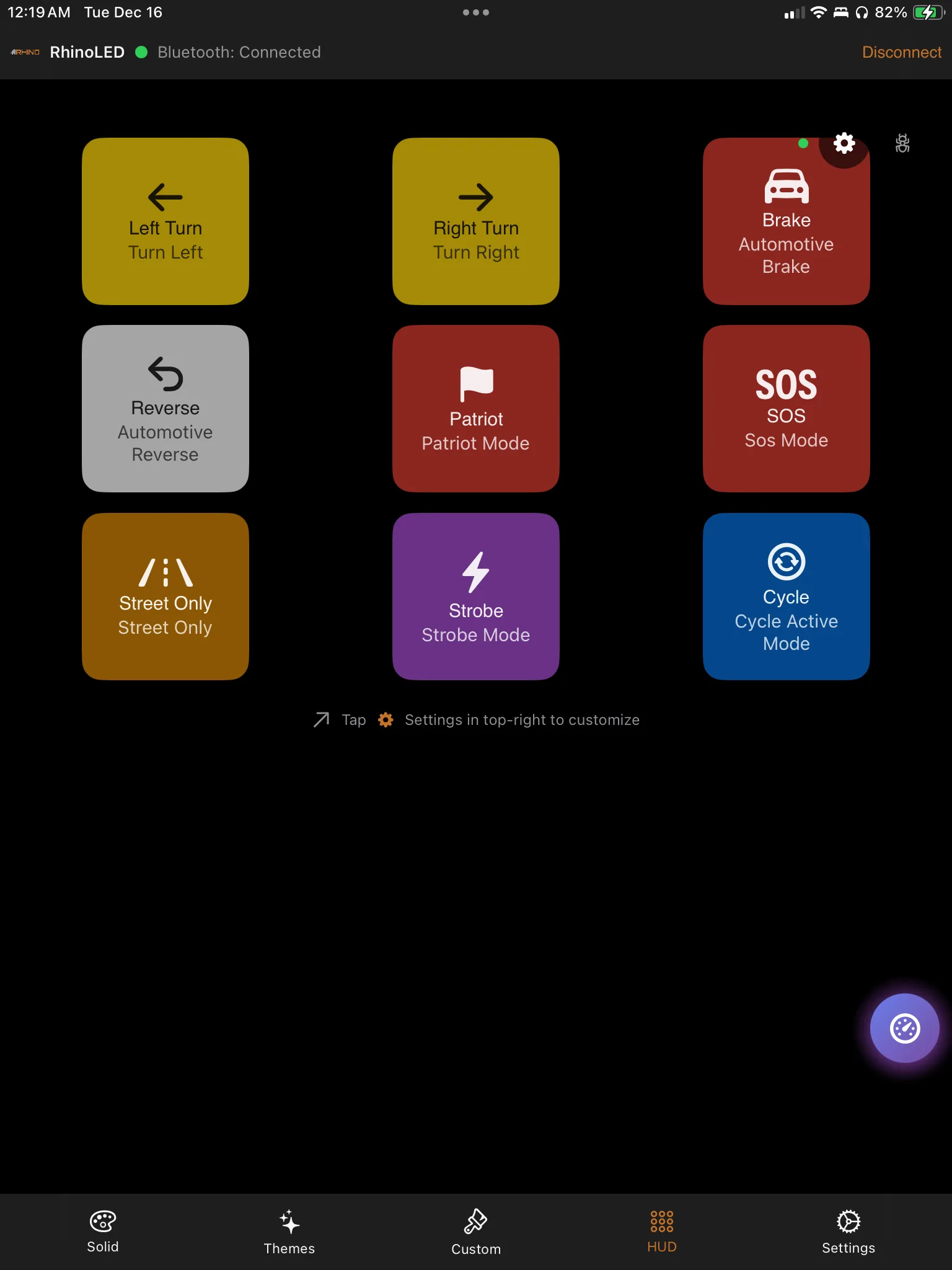
The RhinoLED HUD showing live trigger tiles — left turn, right turn, brake, reverse, Street Only, Patriot, SOS and strobe

How a trigger works

Eight decisions in the app. After that it runs on the vehicle, with or without your phone.

The wire is generic. The meaning is software.

Input 4 is not “the brake input” until you tell the app that is what it is. Change your mind next weekend and the same wire becomes the door input instead — a different job, a different zone, no harness surgery. That is the difference between mapping a signal and hard-wiring one.

What counts as a signal

RhinoLink reads switched 12 V signals — the kind a turn, brake, reverse, courtesy or accessory circuit already provides. Not every circuit on every machine is a clean switched source, so check what you are tapping before you tap it.

STEP 01

The signal arrives

A supported 12 V vehicle signal lands on one of RhinoLink's 12 inputs. Turn, brake, reverse, door, a rocker on the dash — whatever you wired to it.

STEP 02

Choose the RGB action

Pick what the lighting should do when that signal goes live. There are 21 trigger actions to choose from, and the app lists every one of them as you configure.

STEP 03

Choose the zones

Select which of your 5 zones the action touches. Left side only, rear only, all of them. Everything you leave out carries on as it was.

STEP 04

Attach outputs

Optional. Point the same trigger at any of the 8 relay outputs, so one signal moves the lighting and switches hardware together.

STEP 05

Set the priority

A number from 5 to 150 that decides who wins when two vehicle functions want the same zone at the same moment.

STEP 06

Set the debounce

0–1000 ms per input. Long enough to ignore the electrical chatter of a bouncing contact, short enough to keep the real signal instant.

STEP 07

It saves to the board

About 5 seconds after your last edit the configuration is written to the controller — and force-saved if you disconnect before that.

STEP 08

Watch it live

Move the actual lever and the tile lights up in the RhinoLED HUD. The board pushes the state as it changes; the app is not polling for it.

Builds you can configure

None of these are factory defaults. Each one is a trigger you set up — your input, your action, your zones. The zone names below are the ones you type into the app.

Left Whip Right Whip Rock Lights Pod Rings Halos
Build 01

Turn signal build

Input
The left turn circuit, on one of the 12 inputs. The right side gets its own input and its own mirrored configuration.
Lights
Left Whip goes amber. The left-side Diamond RGB rock lights you selected animate with it. The left Pod Rings go amber alongside them.
Untouched
Right Whip Halos Zones you left out of the trigger keep running your pattern the whole time.
In the app
The Left Turn tile lights up in the HUD the instant the lever moves.
Build 02

Reverse build

Input
The reverse circuit. One wire.
Lights
The zones you selected go white — rear zones lighting the ground behind you, Pod Rings switching over with them, Rock Lights if you want the sides too.
Output
The same trigger fires a relay output: backup pods, a work light, whatever that relay runs.
On release
Shift out of reverse and those zones return to the runtime state they held before the trigger took them.
Build 03

Door and puddle build

Input
A door pin switch or the courtesy circuit.
Lights
The Rock Lights you selected come up as puddle and step lighting — so the ground beside the machine is lit before anyone steps down onto it.
Output
Add a relay output if you want an accessory on with it.
Debounce
This is where the 0–1000 ms setting earns its keep. A door switch is a mechanical contact, and mechanical contacts bounce.
Build 04

Switch panel build

Input
A rocker on the dash, or a button on your switch panel.
Choose
An RGB scene across the zones you pick. Or a relay output. Or both — from one trigger configuration.
Labelling
The tile in the HUD carries the name you gave it, so the app reads Camp Mode rather than an input number.
Priority
Give it a floor of your own, anywhere in the 5–150 range, so it slots in above or below the rest of your build.
Build 05 · one button does both

Accessory and RGB, combined

Input
One button. One trigger configuration carrying a trigger action and relay outputs at the same time.
Lights
Rock Lights and Pod Rings drop into a low amber camp scene.
Output
In the same instant, an output fires the relay that runs your light bar.
Why it matters
The commodity model splits this in two: a Bluetooth controller for the LEDs, a separate switch panel for the accessories, and nothing joining them. RhinoLink puts both on one trigger.
What a zone can be

The lights these builds run

Runs on it
Diamond RGB rock lights Rhino 2.0 whips — 1" RGB Rhino 2.5 Fattie whips — 1.3" RGB Rhino RGB halos RGB strip Rhino Pod RGB rings
Does not
Axion RGB+W rock lights Rhino 3.0 RGB+W whips
Scope
RhinoLink runs the Rhino RGB system. Axion and Rhino 3.0 are RGB+W — a separate architecture with its own controller, and the two do not sync.

A pod's RGB ring is part of the RGB system and can join a zone. A pod's high-output main beam is not an addressable zone — it is switched through an appropriately wired external relay off a RhinoLink output.

When two functions want the same zone

Reverse and a running pattern can both want the Rock Lights. RhinoLink decides which one gets the zone, instead of letting two commands fight over it.

Reverse
100
Turn / Hazard
80
Brake
70
Street Only
65
Patriot
60
SOS
55
Standard actions
40

These are floors, not ceilings

Each action starts at the number above. You can raise it anywhere in the 5–150 range when your build wants a different order.

Reverse holds the top floor

Backing up is the moment you most need the zone to do one predictable thing, so reverse starts at 100 — above turn, brake and everything decorative.

Only the contested zone changes

Priority is settled per zone. A brake trigger winning the rear zones does not disturb a whip zone nobody asked for.

Interrupt a zone. Don't break the whole show.

A trigger borrows a zone; it does not reset your build. While the trigger is active that zone does the trigger's job. When it releases, RhinoLink puts the zone back.

What comes back

  • The zone's pattern, colors, brightness and speed return.
  • If another zone is still running that same animated pattern, the returning zone re-joins that live animation.
  • With no matching peer still running it, an animation may start again from the beginning.
  • A solid color restores directly.

This is trigger restore, and it is a different feature from a Startup Profile. A Startup Profile decides how the vehicle wakes up at power-on. Trigger restore is what happens the instant a brake pedal or a turn lever lets go.

Your build, running
RELAY OUTPUT
Your pattern
Trigger active — selected zones white

Reverse takes the zones you selected and fires the relay. Release it, and the build comes back.

The action catalogue

21 trigger actions, plus a relay-only mode. You do not have to memorise them — the app lists the set when you configure a trigger. This is the shape of it.

21 Trigger actions
8 Relay outputs
3 Output modes
0.5–10 Hz Pulse / strobe rate

Automotive

Left turn / right turn

Amber signalling across the zones you chose

Brake

Takes the rear zones the moment the pedal goes down

Reverse

The highest priority floor on the board

Hazard

Shares the turn floor, both sides at once

Street Only

A driving-oriented base mode that sits above the decorative patterns and below turn, brake and reverse

Scene and signal

Pattern and color actions

Send the selected zones to a chosen look

Strobe

A high-contrast attention pattern on demand

SOS

Sits above the standard actions, below the driving functions

Patriot

Its own floor in the ladder above

Cycle active mode

Steps the active mode on from a single button

Outputs

No LED Action — relay only

A trigger that fires outputs and leaves every zone alone. It is a mode on a trigger, not an extra action in the list

Solid

Output held on while the trigger is active

Pulse

Rate configurable from 0.5 to 10 Hz

Strobe

Same configurable 0.5–10 Hz range, faster end of it

Work lights, bar, fan, compressor, backup pods

That is what the 8 outputs are for — hardware that turns on because the vehicle did something. Wire the accessory through its own relay and let RhinoLink switch the coil.

The outputs trigger external relay coils. They do not power a high-current accessory directly — always put an appropriately rated relay between RhinoLink and the load.

Configured once. Then it runs on the vehicle.

Every trigger you set up is written to the controller — about 5 seconds after your last edit, and force-saved if you disconnect first. From then on the vehicle functions do not wait on your phone. Hit the brake with the phone in your pocket, in the truck, or flat on the charger: the zones respond, because the logic is on the board. The rest of what the controller does — zones, patterns, themes, how the vehicle wakes up — is on the RhinoLink overview.

What the app is for

RhinoLED builds the system: triggers, zones, actions, priorities, output labels — plus interactive control when you want to drive the lighting by hand. iPhone, iOS 15.0 or later, free download.

The link stays part of it

Bluetooth Low Energy is how you reach the controller to change anything and how the HUD watches it live. Name the board whatever you like, up to 31 characters.
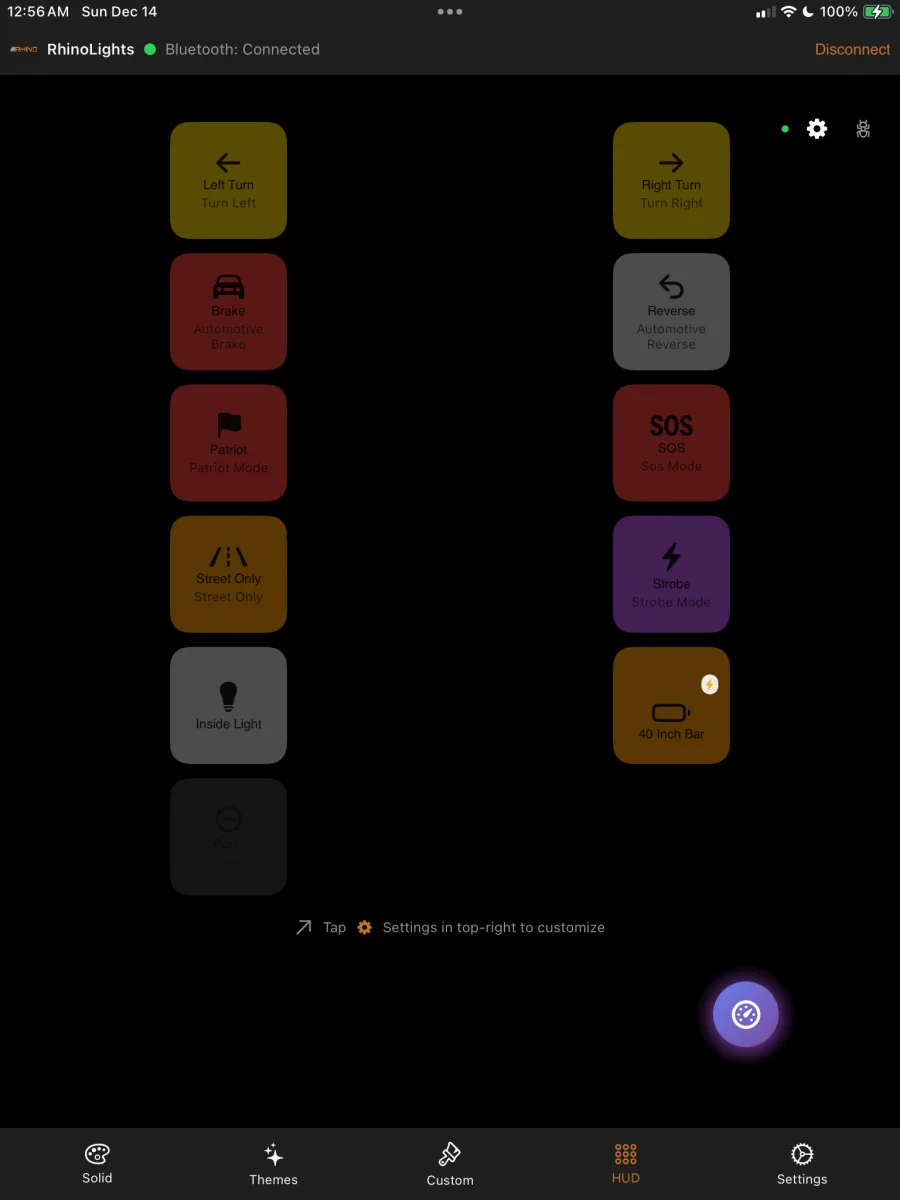
RhinoLED HUD with tiles the owner named — left turn, right turn, brake, reverse, Street Only, Patriot, SOS, strobe, an inside light and a relay-driven light bar

Name the tiles and the HUD reads like your build — “Inside Light”, “40 Inch Bar” — instead of channel numbers. The board pushes state as it changes, so the tile you are looking at is the one the vehicle is running.

Give one wire a new job.

BETA pre-order — first production units are preparing to ship.

Pre-order RhinoLink See the automotive patterns

RhinoLink controls auxiliary and accent lighting. It is not a replacement for required factory vehicle lighting. Lighting regulations vary — check local requirements before public-road use.

Stay Updated

Sign up to get the latest information on new products, early access, and subscriber offers.

No spam, ever. Unsubscribe anytime.

Rhino Lights

Engineered in-house. Built in North Carolina. Premium off-road LED lighting — rock lights, whips, and pod lights — serviceable, and repaired by the people who built them.

704-270-2695 · [email protected]

Products

  • Shop All Products
  • Build a Bundle

  • Diamond RGB Rock Lights
  • Diamond DUO Rock Lights
  • Axion RGB+W Rock Lights
  • Rhino Whip Lights
  • Dual Color Pod Lights
  • RhinoLink Bluetooth Controller
  • Accessories

Company

  • About Us
  • The Rhino Difference
  • Rhino History
  • Custom Services
  • Investors

  • Find a Dealer
  • Become a Dealer
  • Contact Us

Support

  • Installation Guides
  • How to Install
  • Warranty & Repairs
  • Gallery

  • Return Policy
  • Shipping Info
  • Track Order
© 2026 Rhino Lights LLC. All rights reserved. Engineered and built in North Carolina.
Privacy Policy Terms of Service Return Policy
How can we help?

Ask us anything — fitment, brightness, wiring, shipping. A real person answers, usually within a few hours.

Got it — thanks!