Your perfect power-on.
Configured once, kept on the board.
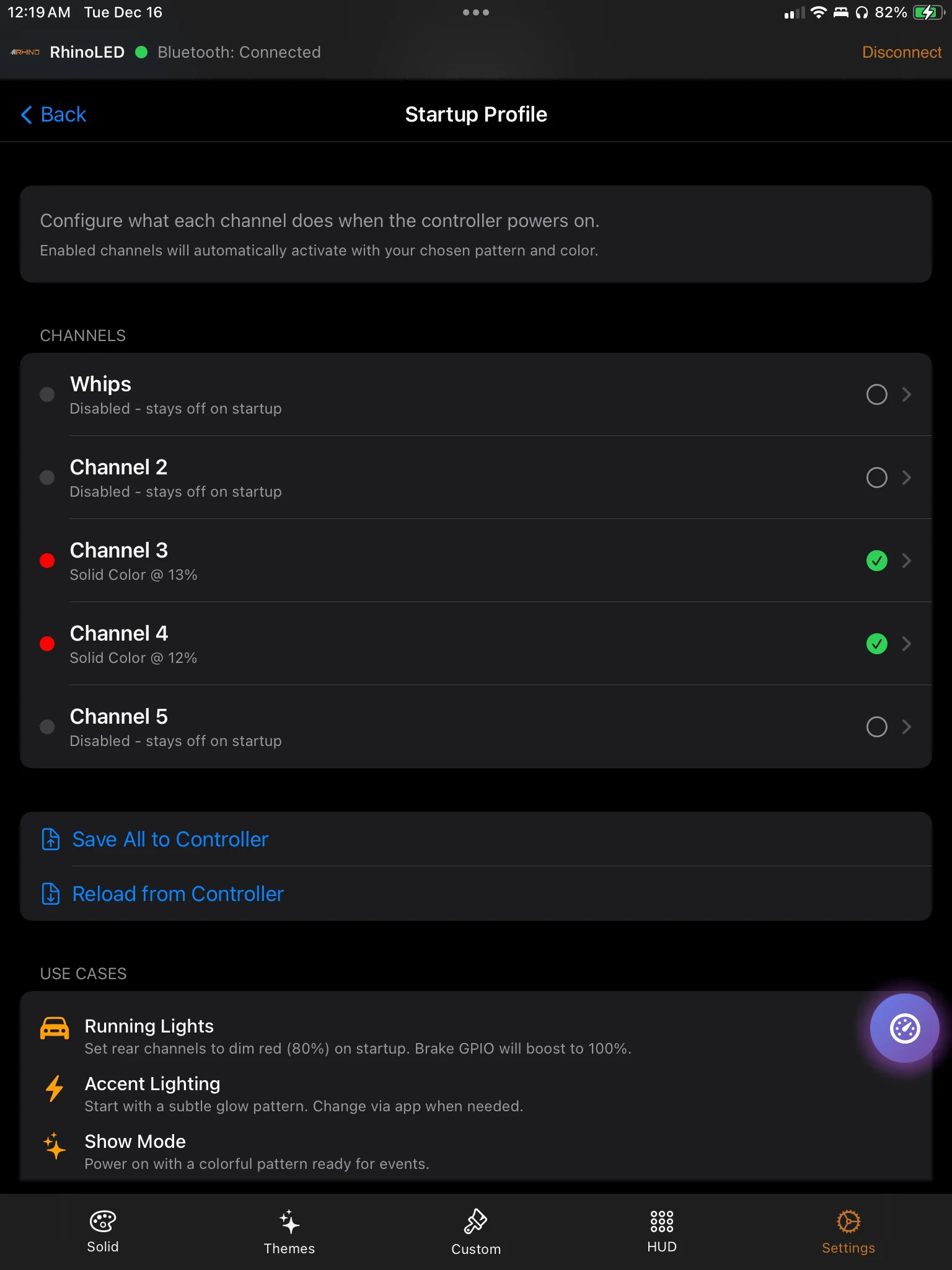
A Startup Profile is the state you want the vehicle to come up in. Choose the zones, choose the pattern, color, brightness and speed, and every power-on starts there — no phone in your hand, no waiting on a connection, nothing to press.
BETA pre-order — first production units are preparing to ship.
What the vehicle does when it wakes up
Every controller comes up in some state. A Startup Profile is you deciding which one.
Without a Startup Profile
Remembered runtime stateZones come up in remembered runtime state — whatever they were doing when the vehicle last lost power.
If last night is still what you want, nothing needs to happen. That is a coin flip, not a decision.
Unlock the phone, open RhinoLED, connect, set the zones back where you want them.
Remembered state only ever remembers the last thing that happened. It has no opinion about how you like to start.
With a Startup Profile
The state you choseThe zones you selected start in the pattern, color, brightness and speed you configured. Intentionally, every time.
Leave a zone out of the profile and it still comes up in remembered runtime state — useful for the one zone you change constantly.
The controller applies the profile itself. The app does not need to be open or connected for it to happen.
Set it once
The profile changes when you change it, and not before. Ride, park, power down, come back a week later — the next power-on looks like the one you configured.
The profile lives on the controller
You write it from the app. The board keeps it and applies it, with no phone interaction at startup.
Board configuration, not an app setting
Saving a Startup Profile writes it to the RhinoLink controller. Change phones, hand the machine to someone else, ride with your phone in a pocket — the profile is on the vehicle.
Applied automatically at power-on
When the controller gets power it reads the profile and drives the zones. There is no pairing step in front of it, nothing to approve, and no app screen to visit first.
Independent across 5 zones
Each RGB zone can start in its own pattern, color, brightness and speed — or sit out of the profile entirely. The app labels zones as channels and lets you rename them.
What the app is for
RhinoLED is where you build the profile: set the lighting the way you want the vehicle to come up, then store that state on the board. After that, the app is for changing things — not for starting them.
Startup Profile is not trigger restore
Two different features, at two different moments. Neither one is the other’s fallback.
Feature one
Startup Profile
Controls power-on.
- When
- The moment the controller receives power.
- What it does
- Applies the pattern, color, brightness and speed you configured to the zones you selected.
- Where it lives
- On the RhinoLink board, applied with no phone interaction.
- What it is not
- It is not where a zone goes when a trigger lets go of it.
Feature two
Trigger restore
Returns a zone to its pre-trigger runtime state.
- When
- The moment a trigger releases a zone it had taken over.
- What it does
- Pattern, colors, brightness and speed return to what that zone was running before the trigger. If another zone is still running the same animated pattern, the returning zone re-joins that live animation phase; with no matching peer an animation may restart from the beginning. Solid states restore directly.
- Where it lives
- Also on the board — but it is a separate behavior with its own moment.
- What it is not
- It does not send the zone to your Startup Profile.
In plain words
The Startup Profile decides how the vehicle comes up. Trigger restore decides where a zone goes when a brake, turn or accessory input releases it. Configuring one does not configure the other, and one never stands in for the other.
See the trigger system for how a vehicle input takes over a zone in the first place.
RhinoLink controls auxiliary and accent lighting. It is not a replacement for required factory vehicle lighting. Lighting regulations vary — check local requirements before public-road use.
Four profiles people actually set
One feature, four different opinions about what a power-on should look like.
The trail build that starts subdued
Early startsRock Lights and Halos start on a low solid so loading the trailer before sunrise does not light up the whole staging area. The whips stay out of the profile and come up however you left them.
In the profile
- Rock Lights — solid, low brightness
- Halos — matched to the rock lights
- Left Whip and Right Whip — left out on purpose
The show vehicle that starts in its signature theme
Events and meetsEvery zone starts in the same theme, at the brightness you picked. The vehicle rolls into the lot already looking like itself, before anyone has taken a phone out of a pocket.
In the profile
- All 5 zones — the same theme, the same speed
- Brightness set once, so no zone arrives louder than the rest
- Nothing to set up at the venue
The UTV that starts with its preferred accent configuration
Weekend rigLeft Whip and Right Whip come up in the colors you run, with Rock Lights matched underneath. Pod Rings sit out of the profile because that is the zone you change most.
In the profile
- Left Whip and Right Whip — your colors, your speed
- Rock Lights — matched to the whips
- Pod Rings — left out, so they keep remembered runtime state
The truck with a predictable underbody setup
Daily driverThe underbody RGB strip starts on the same color and brightness every single time. Nothing to guess about what last night left behind, and nothing to correct on the way out of the driveway.
In the profile
- RGB strip — one color, one brightness, no animation
- Same result whether the truck sat overnight or for a month
- Change it when you want to, from the app
A Startup Profile stores a pattern, its colors, its brightness and its speed — the same four things you set when you are riding.
Setting one up takes about a minute
Three steps in RhinoLED, then the board handles it.
Get the lighting right
Set the zones the way you want the vehicle to come up — pattern, color, brightness, speed.
Save it as your Startup Profile
Pick the zones the profile should own and store the state on the controller.
Power-cycle to confirm
Shut the vehicle down and start it again. What you saved is what comes up.
Then stop thinking about it
A Startup Profile is a decision you make once. It holds until you change it, and it does not need the app, a connection or a routine to keep working.
Start every ride the way you meant to.
RhinoLink keeps your power-on state, your trigger mappings and your LED configuration on the board.
BETA pre-order — first production units are preparing to ship.